

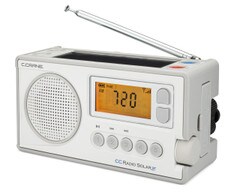
C.Crane CCRadio Solar AM/FM/Weather + Alert Windup Emergency Radio with Bluetooth® Receiving (CCRSBT)
- Brand: C.Crane
- P\N: CCRSBT


 Live Chat
 Contact Us


Description
C.Crane CCRadio Solar AM/FM/Weather + Alert Emergency Radio with Bluetooth Receiving (CCRSBT)
Best For
Emergency preparedness, cabins, boats, travel, and everyday listening where users want AM/FM/weather reception, Bluetooth audio, multiple charging methods, a flashlight, and backup power options.
Why Choose the CCRadio Solar?
This compact emergency radio combines conventional radio reception with Bluetooth receiving and several ways to recharge its included lithium-ion battery.
Key Benefits
- AM/FM/weather plus alert functionality identified in the product title
- Bluetooth receiving for audio from a compatible phone
- Included rechargeable lithium-ion battery
- Recharge by hand crank, solar panel, or USB; optional AC adapter not included
- Can also use three AA alkaline batteries, not included
- Two audio/power modes described in existing content
- Built-in flashlight
- Existing content states approximately 50 hours of radio runtime under specified conditions
- Can provide supplemental phone charging from its internal battery according to existing information
Who Should Buy the CCRSBT?
Users who want a versatile emergency/everyday radio and have confirmed desired weather-alert features, charging connections, battery requirements, Bluetooth compatibility, and local reception conditions.
Runtime Note
Battery runtime and phone-charging results depend on operating mode, Bluetooth use, battery condition, volume, charging source, and connected device.
Features
| General Features: | |
|---|---|
|
|
Specifications
Please Read Me First
CCRadio Solar - Battery Charging
The radio's Li-ion battery is shipped with a low charge. Please fully charge the battery before using the radio or placing into storage. When storing the radio it is recommended to recharge the Li-ion battery at least every six months. This keeps the battery healthy.
- Before charging please remove the battery cover.
- Remove the small plastic pull tab between the battery and the contact.
- Make sure the battery is pushed down to make contact with the battery terminal.
- Replace the battery cover.
- Connect the Micro USB charging cable or the optional AC charging adapter (sold separately) to the radios’ charging jack under the flap.
- Connect the USB end of the charging cable to a USB wall charger or a USB charging device. If using the optional AC charging adapter, plug into an AC outlet.
Charging can take 10-12 hours using the radio charging jack.
 WARNING: Cancer and Reproductive Harm - www.P65Warnings.ca.gov